
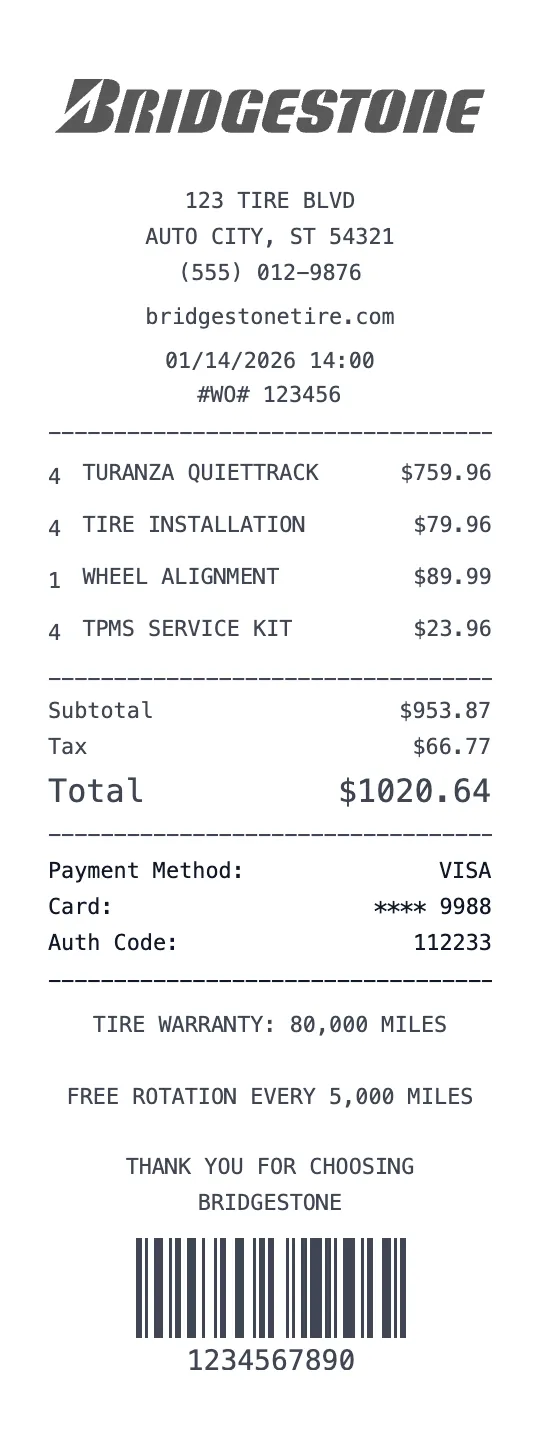
Generate a professional Bridgestone tire service receipt with our receipt maker. Bridgestone Americas operates over 2,200 company-owned retail locations in the United States through its Firestone Complete Auto Care and Tires Plus Total Car Care chains, plus thousands of independent Bridgestone authorized dealers. Bridgestone tire receipts are essential for tire warranty registration, vehicle maintenance records, and service documentation. Our template replicates the Bridgestone tire service receipt format.
Bridgestone tire receipts contain specific automotive service details not found on standard retail receipts. Each tire line item shows the tire brand (Bridgestone, Firestone, associated brands), tire model name (e.g., 'Turanza QuietTrack', 'Potenza Sport', 'Blizzak WS90'), tire size designation (e.g., '225/45R17 94W'), quantity (typically 2 or 4), and per-tire price. For tire installation, the receipt includes mount and balance charges, valve stems, tire disposal/recycling fees, and road hazard warranty. Our generator handles all tire-specific formatting.
Tire service receipts also document additional automotive services performed during the visit. Oil changes, brake inspections, wheel alignments, tire rotations, and fluid services appear as separate line items with part numbers and labor charges. Our template supports the full range of Bridgestone/Firestone service offerings with parts and labor breakdowns. The receipt includes the vehicle information: year, make, model, and mileage at time of service.
Bridgestone tire warranties are a key reason customers keep tire receipts. New Bridgestone tires come with a manufacturer's warranty (typically 5 years or tread life warranty), and many purchases include optional road hazard coverage. The receipt documents the warranty start date, tire serial numbers (DOT codes), and coverage terms. Without the purchase receipt, warranty claims become significantly more difficult.
Our Bridgestone receipt generator is essential for tire warranty claims, vehicle maintenance records, tire mileage tracking, fleet vehicle service documentation, and insurance records after vehicular incidents. All fields customizable including tire specifications, service charges, vehicle information, and warranty details. Download free.
Key Features of our Bridgestone Template
Tire Specifications
Full tire details including brand, model name, size designation (e.g., 225/45R17 94W), and DOT serial number for warranty.
Installation Charges
Itemized mount and balance, valve stems, tire disposal/recycling fees, and TPMS sensor service charges.
Road Hazard Warranty
Add optional road hazard protection coverage with terms, duration, and per-tire pricing.
Vehicle Information
Includes year, make, model, VIN (partial), and mileage at time of service for comprehensive maintenance records.
Service Menu
Support for oil changes, brake service, alignment, tire rotation, fluid services, and battery replacement alongside tire purchases.
Parts & Labor Breakdown
Separate line items for parts and labor charges with per-service pricing and total calculations.
How to Generate a Bridgestone Receipt
Create your custom document in three simple steps.
Load Template
The Bridgestone template is pre-loaded with the correct logo, address format, and column layout.
Customize Data
Click any field to edit. Add your specific items, set the date to today (or any past date), and adjust prices.
Export & Print
Download high-res PDF or JPG. For best results, print on thermal paper or use our "Thermal Texture" setting.
Why Use This Bridgestone Receipt Template?
Tire Warranty Claims
Register and claim Bridgestone tire warranties with receipts showing tire model, size, DOT code, and purchase date. Essential for tread life and defect warranty claims.
Vehicle Maintenance Log
Document every tire service and automotive maintenance visit. Create a comprehensive service history with dates, mileage, and services performed.
Fleet Vehicle Records
Fleet managers: track tire purchases and replacements across multiple vehicles with receipts showing vehicle info, tire specs, and service charges.
Insurance Documentation
After a tire-related incident or accident, document tire age and condition at last service with receipts showing DOT codes and installation dates.
Frequently Asked Questions
Common questions about creating Bridgestone receipts.