
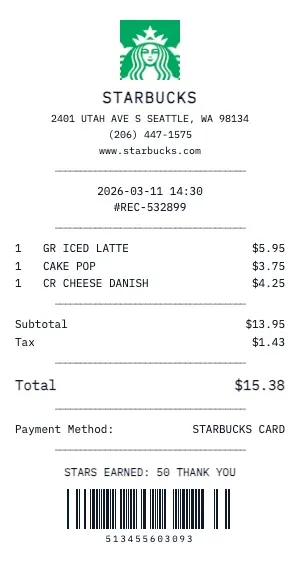
Generate a realistic Starbucks coffee shop receipt with drink customizations, pastry items, and tip lines. Our cafe receipt format includes drink size, milk choice, espresso shots, syrup flavors, and temperature — just like a real barista receipt.
The Starbucks coffee receipt template handles complex drink builds: base drink, size (Tall/Grande/Venti or S/M/L), milk type (Whole, Oat, Almond, Soy), extra shots, syrup pumps, whipped cream, and custom modifications. Each customization can be individually priced.
Perfect for food bloggers, lifestyle content creators, and expense trackers. Our Starbucks receipt captures the café experience: mobile order numbers, reward star balances, "Order Ahead" timestamps, and personalized cup name fields.
Our Starbucks template also supports food items found in coffee shops: breakfast sandwiches, pastries, cake pops, protein boxes, and seasonal specials. Add loyalty card punches, promo code discounts, and the signature "See you tomorrow!" footer.
Key Features of our Starbucks Template
Drink Customization
Full customization support: size (Tall/Grande/Venti), milk choice (Oat, Almond, Soy), extra shots, syrup, and temperature.
Mobile Order Format
Display mobile order number, pickup window time, and 'Order Ahead' timestamp for drive-thru style receipts.
Reward Stars/Points
Show loyalty stars or points earned, current balance, progress to next reward, and birthday reward status.
Barista Bar Details
Include barista-specific modifiers: light ice, no whip, extra foam, upside down, and custom temperature.
Food & Pastry Items
Add breakfast sandwiches, pastries, cake pops, protein boxes, and seasonal specials with proper cafe formatting.
Tip Line & Totals
Include tip line with suggested amounts, tax on food items, and the warm 'See you tomorrow!' footer message.
How to Generate a Starbucks Receipt
Create your custom document in three simple steps.
Load Template
The Starbucks template is pre-loaded with the correct logo, address format, and column layout.
Customize Data
Click any field to edit. Add your specific items, set the date to today (or any past date), and adjust prices.
Export & Print
Download high-res PDF or JPG. For best results, print on thermal paper or use our "Thermal Texture" setting.
Why Use This Starbucks Receipt Template?
Daily Spending Audit
Track your daily Starbucks habit to understand the true cost. Generate receipts showing your regular orders — that $6 oat milk latte adds up to $2,190/year!
Client Meeting Receipts
Met a client at Starbucks? Document the meeting expense with an itemized receipt showing both orders. Perfect for freelancer expense deductions and consulting write-offs.
Social Media Content
Coffee influencers and lifestyle bloggers: create aesthetic Starbucks receipts for Instagram stories, TikTok flat lays, or blog photography. Receipts add a relatable, real-life touch.
Team Coffee Runs
Running a Starbucks coffee order for the office? Create a detailed receipt showing each person's drink, customizations, and cost for easy reimbursement and cost splitting.
Frequently Asked Questions
Common questions about creating Starbucks receipts.
Does the Starbucks receipt include a return policy?
Can I create a gift receipt version?
Are SKU and barcode numbers included?
How do I make a Starbucks receipt?
Is this Starbucks receipt template free?
Can I remove the watermark?
What tax rate does the Starbucks template use?
Is it legal to create fake receipts?
Can I add a barcode to the Starbucks receipt?
Does this work on mobile devices?
Can I change the currency on the Starbucks receipt?
How realistic is the thermal paper effect?
Learn More
Free Starbucks Receipt Generator
Tips, FAQs, and a complete walkthrough for creating realistic Starbucks receipts.
You Might Also Like
Other Coffee & Cafe receipt templates you can customize
Related Searches for Starbucks Receipts
Anatomy of a Real Starbucks Receipt
What makes a Starbucks receipt look authentic
Every detail matters. Here\u2019s what a genuine Starbucks receipt includes \u2014 and how our generator replicates each element.
Header & store info
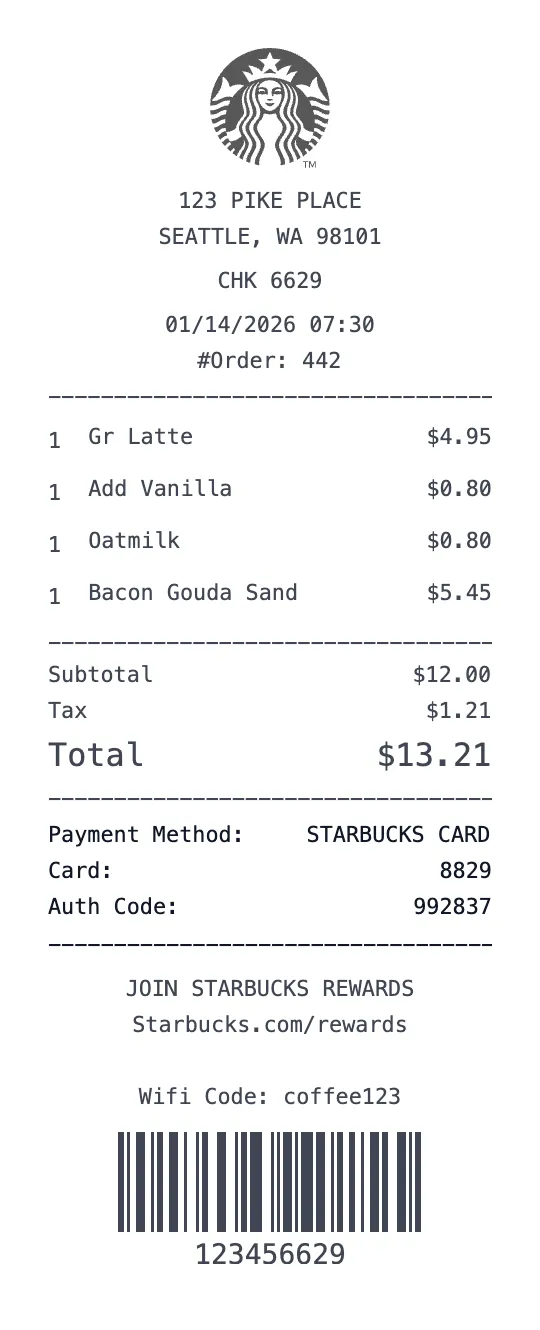
Starbucks receipts open with the green Siren logo, store address, store number ("Store #07645"), and date/time.
Line item format
Item descriptions are short and lowercase ("grnde caramel macchiato", "lg pike place"). Customizations (extra shot, oat milk) print as indented sub-lines beneath the parent item.
Pricing & discounts
Starbucks Rewards stars and gold-status discounts apply post-subtotal. Mobile order ID prints as "Mobile Order — JANE D" near the top.
Footer codes & IDs
Transaction number, register number, and a 4-digit customer code for the survey ("Tell us how we did at MyStarbucksVisit.com — Customer Code: 1234").
Paper & font
80mm thermal, distinctive green-accent header, sans-serif friendly font.
Brand voice
Receipts include the tagline\u00a0\u201cInspiring and nurturing the human spirit\u201d when applicable.
Starbucks receipts are recognizable by the abbreviated drink names, the indented customization lines, the green-accent header, and the survey customer code at the bottom. Our template captures all of these.
Real items people buy at Starbucks
Our template comes pre-filled with realistic items so the receipt looks authentic instantly. Edit any line to match your purchase.
When people use Starbucks receipt templates
Office coffee runs / client meeting expenses.
Replacement when the mobile order email is missing.
Recreating a multi-drink receipt for an event budget.
Starbucks receipt FAQ
Specific questions about Starbucks receipts, answered.
How are Starbucks customizations printed?+
What's the Starbucks customer code?+
Do mobile orders look different?+
Why are item names abbreviated?+
Similar receipts you can create
Brands often searched alongside Starbucks.