
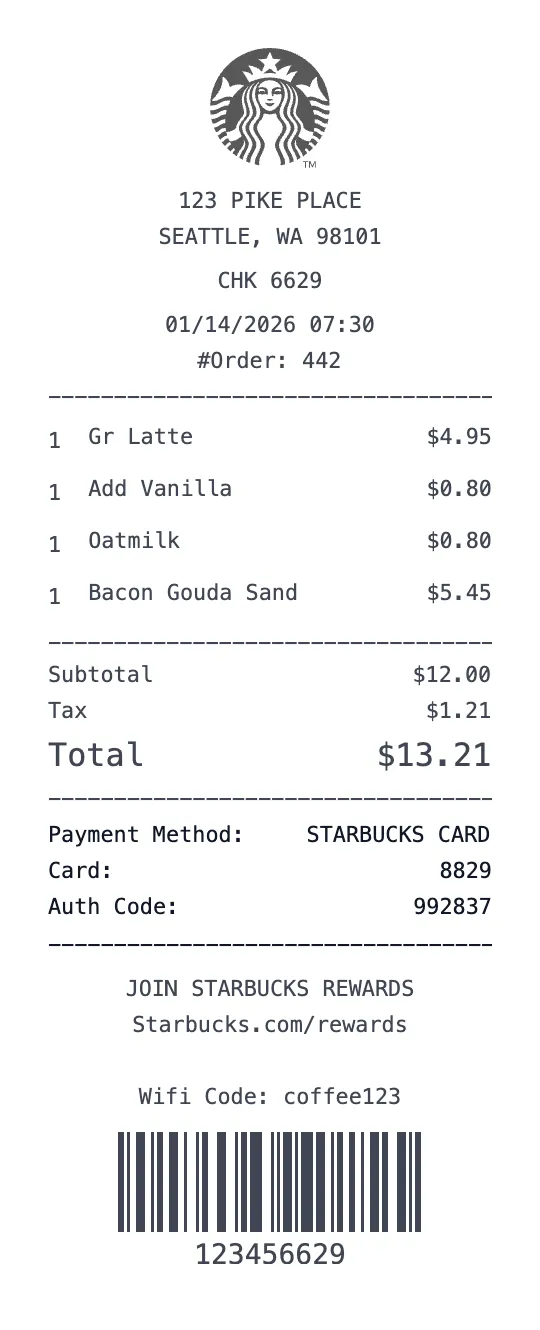
Generate an authentic Starbucks coffee receipt with our professional receipt maker. Starbucks Corporation is the world's largest coffeehouse chain, operating over 16,000 company-owned and licensed stores in the United States alone. The Starbucks receipt format is unique among food and beverage retailers because it reflects the complexity of their drink customization system — each beverage line item can include the drink name, size (Tall, Grande, Venti, Trenta), milk choice, espresso shot count, syrup flavors, and temperature modifications. Our template captures all of these details in the exact format used by Starbucks POS systems.
What makes a Starbucks receipt distinctive is the drink customization breakdown. Unlike a simple coffee shop that lists 'Latte — $5.00', a Starbucks receipt shows the base drink with every modification listed underneath: 'Gr Iced Caramel Macchiato — $6.45' followed by indented modifiers like 'Sub Oat Milk +$0.80', 'Add Extra Shot +$1.00', 'Lt Ice', and 'Upside Down'. Our generator supports the full customization vocabulary that Starbucks baristas use, including milk alternatives (Oat, Almond, Soy, Coconut), syrup pumps count, temperature (Extra Hot, Iced, Blended), and specialty modifiers.
Starbucks Rewards is one of the most popular loyalty programs in American retail, with over 33 million active members. Every Starbucks receipt shows Stars earned on the transaction, current Star balance, progress toward the next reward, and Rewards tier (Green or Gold). Our template includes the complete Rewards section, allowing you to set Star earnings rates (1 Star per dollar with registered card, 2 Stars per dollar with Starbucks Card), display bonus Star promotions, and show the 'Next Reward in X Stars' progress indicator.
The Starbucks receipt also includes the mobile order number for app-based orders, the barista name for in-store orders, the store number, and the distinctive warm closing messages ('Thank you for visiting Starbucks', 'Kindly brewed for you by [barista name]'). Our template supports both in-store counter orders and mobile/drive-thru order formats, which have slightly different layouts. You can also add food items (breakfast sandwiches, cake pops, protein boxes) alongside beverages.
Our Starbucks receipt generator is perfect for expense documentation (client meetings, business travel coffee), spending habit tracking (that daily $6 latte adds up to $2,190/year), social media content creation, and budget awareness. Whether you're a coffee influencer documenting orders, a freelancer deducting client meeting expenses, or simply tracking your caffeine budget, this tool creates the most accurate Starbucks receipt available online. Fully customizable and free.
Key Features of our Starbucks Coffee Template
Full Drink Customization
Supports Starbucks' complete modification system: size (Tall/Grande/Venti/Trenta), milk type, extra shots, syrup pumps, temperature, and specialty modifiers.
Starbucks Rewards Section
Shows Stars earned, current balance, tier status (Green/Gold), progress to next reward, and bonus Star promotion indicators.
Mobile Order Format
Toggle between in-store, mobile order, and drive-thru receipt layouts with order numbers, pickup names, and timestamps.
Barista Name & Store Info
Add barista name, store number, register, and the warm 'Kindly brewed for you by...' footer message.
Food Item Formatting
Support for breakfast sandwiches, pastries, cake pops, protein boxes, and seasonal specials alongside drink orders.
Modification Pricing
Automatically adds upcharges for milk alternatives (+$0.80), extra shots (+$1.00), and other modifications with correct pricing.
How to Generate a Starbucks Coffee Receipt
Create your custom document in three simple steps.
Load Template
The Starbucks Coffee template is pre-loaded with the correct logo, address format, and column layout.
Customize Data
Click any field to edit. Add your specific items, set the date to today (or any past date), and adjust prices.
Export & Print
Download high-res PDF or JPG. For best results, print on thermal paper or use our "Thermal Texture" setting.
Why Use This Starbucks Coffee Receipt Template?
Client Meeting Expenses
Met a client at Starbucks? Create an itemized receipt showing both orders with drink customizations and total. Perfect for freelancer expense deductions and corporate travel reimbursement.
Coffee Budget Awareness
Track your daily Starbucks habit to understand the true cost. Generate weekly/monthly receipts showing your regular orders — that $6.45 Oat Milk Caramel Macchiato costs $2,354/year at 365 days.
Social Media Content
Coffee influencers and lifestyle bloggers: create aesthetic Starbucks receipts for Instagram stories, TikTok flat lays, or blog photography. Receipts showing exotic customizations get high engagement.
Rewards Optimization
Track your Starbucks Rewards progress by generating receipts with Star earnings and balance. Plan your spending to time Gold status earning and free reward drink redemptions.
Frequently Asked Questions
Common questions about creating Starbucks Coffee receipts.
Can I add drink customizations like the real receipt?
Does it show Starbucks Rewards Stars?
What sizes does it support?
Can I make a mobile order receipt?
Is this Starbucks receipt template free?
Starbucks Coffee Receipt Examples
Browse real-world receipt examples to see what different Starbucks Coffee receipts look like.
Starbucks Coffee Receipt Example
Realistic Starbucks receipt for a typical coffee order. Shows customizations, sizes, and the standard Starbucks POS receipt format.
Starbucks Mobile Order Receipt Example
Example Starbucks mobile order receipt showing app order details, stars earned, and pickup confirmation format.
Starbucks Drive-Thru Receipt Example
Starbucks drive-thru receipt example with afternoon drinks and food items. Realistic thermal receipt format.
Learn More
Free Starbucks Receipt Generator
Tips, FAQs, and a complete walkthrough for creating realistic Starbucks Coffee receipts.